


 Westinghouse Targets $50 Billion Valuation in U.S. IPO
  Guterres Urges Stronger Global AI Safeguards Ahead of UN Assembly
  Databricks to Invest $350 Million in Singapore AI Expansion
  US Federal Register Drops Alibaba Qwen AI Search Tool
  Qualcomm Gains on $60B Amazon AI Chip Deal
  AI is supercharging money scams – here’s what you can do to protect yourself
  Hyundai CEO Warns Chinese Automakers Could Disrupt US Market
  Trump Plans Federal AI Force and AI Czar
  Nvidia CEO Jensen Huang Expected at Trump-Xi State Dinner
  Cathie Wood Backs AI Slowdown as Safety Concerns Grow
  Petrobras Joins Brazil’s New Diesel Subsidy Program
  NASA, Boeing Discuss Expanding Starliner Missions
  China Reviews Broadcom Switch Use in State Data Centres
  SoftBank Launches $11 Billion Bond Sale to Fund OpenAI Investment
  Meta Partners With Shopify to Bring Shop Pay Checkout to Muse AI
  Meta CEO Zuckerberg Backs Independent AI Safety Reviews Over Development Slowdown
  fnny Beta Launches With a Simple Idea: Find an Event, Show Up, Get Rewarded


 Add as a preferred source on Google
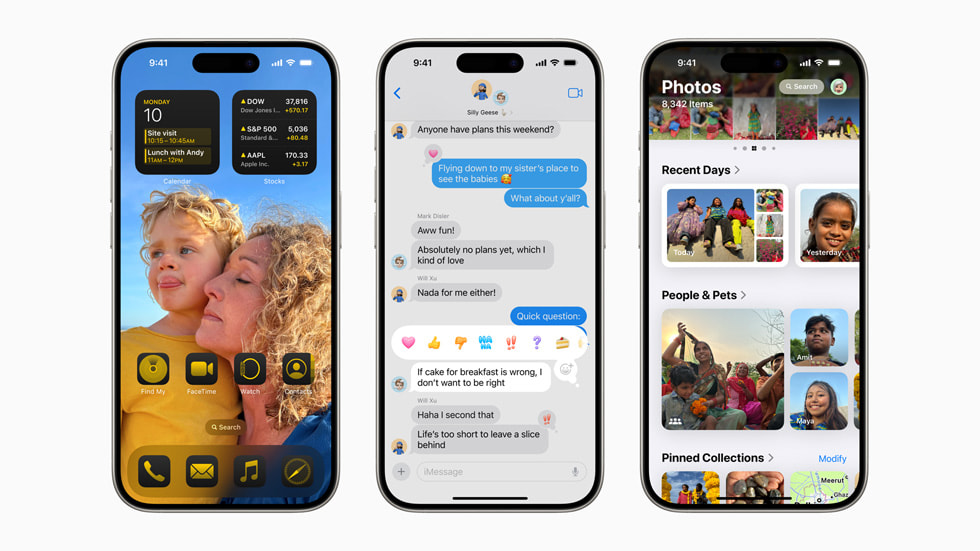
Apple has issued the Release Candidates for iOS 18, iPadOS 18, and watchOS 11, giving developers early access to the new software. This update follows the eighth beta release and includes numerous enhancements and new features. Developers can download these updates from the Settings app.
Apple Seeds Release Candidates for iOS 18 and watchOS 11
Release candidates for the next iOS 18 and iPadOS 18 updates were seeded to developers today by Apple. The software comes one week after the eighth betas were released, and developers can try it out.
Those who have registered as developers can access the betas by navigating to the Software Update section in the Settings app and then selecting the "Beta Updates" option. Finally, they can toggle the iOS 18/iPadOS 18 Developer Beta setting to on.
You can't get the beta without the Apple ID that comes with a developer account, so keep that in mind. There is now a distinct beta track for iOS 18 and iPadOS 18 and a separate beta track for iOS 18.1 and iPadOS 18.1, with the.1 betas introducing support for Apple Intelligence for devices that can handle the capabilities.
AI Features in iOS 18 with Apple Intelligence
Based on what we know from MacRumors, Apple Intelligence is a suite of AI capabilities that is firmly integrated into iOS 18. While Apple Intelligence is still in its early stages of beta testing, it already has capabilities to enhance Siri and search, generate graphics and emoji, and refine and edit written content. With the integration of ChatGPT, the personal assistant will be able to answer more complicated questions, and Siriis improving her grasp of natural language.
While the iPhone 15 Pro and iPads powered by the M-series CPU are the only devices that can use Apple Intelligence features at the moment, plenty of other updates are on the way. In addition to a dark mode and tinting options, Apple is letting users rearrange the apps on the Home screen to create more open space.
Updated Lock Screen and Control Center Features
Lock Screen Flashlight and Camera icons can be changed or removed, and third-party developers can add controls for their apps to the Control Center.
With the help of Rich Communication Services, you can have better discussions with Android users, send texts at a later time, add additional effects to your texts, send messages over satellite when cellular service is unavailable, and use any emoji you want for your Tapback responses.
Now, you can lock and conceal apps, so even when your phone is unlocked, no one can open them without secondary Face ID or Touch ID authentication. The Passwords app is specifically for logins, passkeys, Wi-Fi passwords, and verification codes.
The Photos app now has a new interface, Safari's highlights feature summarizes articles and reveals important information on webpages, and Apple Cash now has a new Tap to Cash function for secure, private money transfers.
In addition, you can use your head motions to interact with Siri on AirPods, solve equations, and transcribe voice memos in Notes. There's also a game mode to help you play games better.
Another beta for developers to test is the candidate version of the next watchOS 11 upgrade from Apple. This one arrives a week after the seventh beta.
Developers can access the watchOS 11 Developer Beta by opening the Apple Watch app, navigating to the Software Update area under "General" in Settings, and toggling on the beta designation. A developer account that is associated with an Apple ID is necessary.
Under the same Software Update option, you can download watchOS 11 after beta updates have been activated. The software installation process requires an Apple Watch to be at least 50% charged and connected to an Apple Watch charger.
With the new Vitals app in watchOS 11, users can monitor their vitals—heart rate, respiration rate, and other metrics—during the night and get daily health insights to see if anything has changed. Another useful feature is the Training Load, which allows you to track the effects of your exercises over time based on their intensity.
watchOS 11 Features Smart Stack and Activity Rings
New widgets, support for Live Activities and Translate, and improved time- and routine-based widget suggestions are all part of the Smart Stack's latest release. Workouts are now compatible with the Check In safety feature, and the Photos watch face now has picture suggestions.
One can alter the daily objectives in Activity Rings, and taking a break for sick days or rest days doesn't void an activity streak. Apps may now be navigated with one hand with Double Tap, and Apple Maps now allows users to build their own hiking and walking itineraries.







