


 Trump Bans CNN, MS NOW and Politico From White House
  OpenAI Urges US-Led Global Standards for Frontier AI
  FAA Allows Boeing to Sell 35 More 777F Freighters Beyond 2028
  China Vanke Shares Jump as Beijing Moves to Ease Debt Pressure
  Who should own the knowledge that underpins AI technology?
  SK Hynix, Intel Discuss U.S. Memory Chip Production Deal
  China Reviews Broadcom Switch Use in State Data Centres
  Databricks to Invest $350 Million in Singapore AI Expansion
  Cathie Wood Backs AI Slowdown as Safety Concerns Grow
  Petrobras Joins Brazil Diesel Subsidy Program
  Westinghouse Targets $50 Billion Valuation in U.S. IPO
  SoftBank Launches $11 Billion Bond Sale to Fund OpenAI Investment
  Burnham Eyes UK Leadership Role in AI Ahead of Trump Meeting
  Trump Plans Federal AI Force and AI Czar
  Volkswagen Shares Slide After 2026 Profit Outlook Cut
  Paramount-Warner Bros $110 Billion Deal Draws Antitrust Backlash
  DOJ Will Investigate AI-Related Crimes, Attorney General Blanche Says


 Add as a preferred source on Google
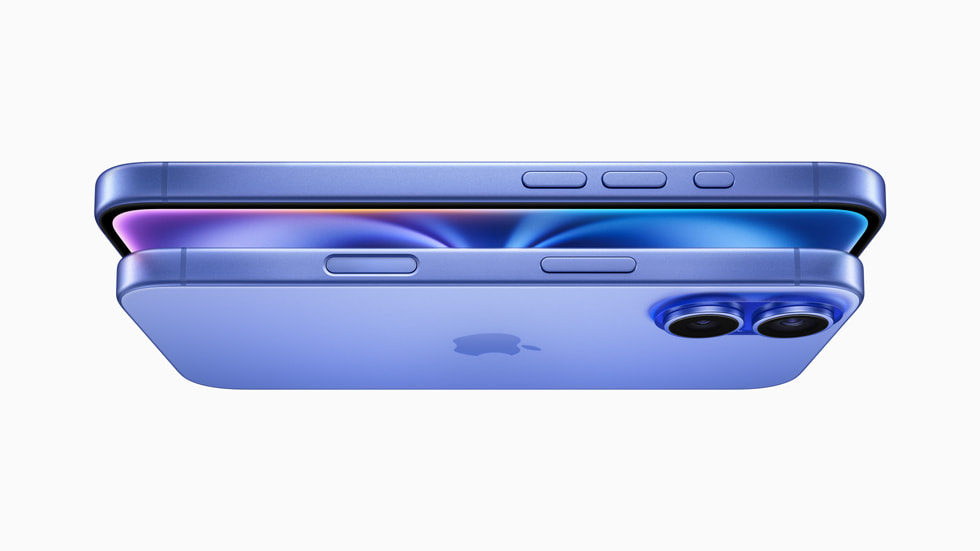
Apple has introduced a Camera Control button on the iPhone 16, making it easier for users to take photos and videos. Located under the power button, it provides quick access to the camera app, letting users adjust settings with simple taps and presses.
Apple Introduces Camera Control Button
Today, Apple showcased the iPhone 16 variants, all of which include a new Camera Control button on the right side of the device, beneath the power button. The Camera Control button has multiple uses while taking pictures or videos, as explained by MacRumors.
Built with a force sensor and a touch sensor to allow varied movements, the Camera Control button is designed to work in either landscape or portrait mode, according to Apple.
- Single click - Open up the Camera app (or a third-party app).
- Single click, Camera open - Take a photo.
- Click and hold - Open Camera app, start a video recording.
- Light press - Open up controls like zoom. This button will also lock focus and exposure (coming this fall) for reframing shots without losing focus.
- Double light press - Bring up the camera preview menu to choose different controls like exposure or depth of field.
- Swipe - Swap through available adjustment options, and also change parameters like zoom, exposure, or depth of field when a control is selected.
Thanks to the button's robust software support, you may quickly and easily switch between control functions without opening the Camera app.
- Adjust zoom
- Adjust exposure
- Adjust depth of field
- Swipe through different stylistic options
Third-Party Developers Can Enhance Apps
The Camera Control can be utilized by third-party developers to enhance their own apps by modifying settings. It is compatible with social networking apps like as Snapchat.
A new visual intelligence capability will be compatible with Camera Control later this year. Launching the Camera app will allow users to focus on an object and acquire details about it using a click-and-hold action. By pointing it at a plant, for instance, you may see the name of the plant; by pointing it at a restaurant, you can see the hours and reviews of that restaurant. A date-containing object, such a flyer, can have its date added to the Calendar app using the visual control.
When customers wish to find something to buy on Google or utilize ChatGPT to fix an issue, Camera Control will act as a gateway to third-party solutions.
Sleek Design with Sapphire and Steel Accents
The sensitivity of the button to light presses and the speed of the double press are both customizable in the settings.
The Camera Control is encased in a sleek sapphire crystal and adorned with stainless steel accents. With its haptic feedback and little inset into the iPhone's frame, the force sensor simulates the shutter of a DSLR camera.







