


 Qualcomm Gains on $60B Amazon AI Chip Deal
  Westinghouse Targets $50 Billion Valuation in U.S. IPO
  China Reviews Broadcom Switch Use in State Data Centres
  Japan, U.S. Discuss $19 Billion GlobalFoundries Chip Plant
  DOJ Will Investigate AI-Related Crimes, Attorney General Blanche Says
  Burnham Eyes UK Leadership Role in AI Ahead of Trump Meeting
  Who should own the knowledge that underpins AI technology?
  Hyundai CEO Warns Chinese Automakers Could Disrupt US Market
  US Northeast Airports Resume Operations After Telecom Outage Disrupts Thousands of Flights
  Meta Partners With Shopify to Bring Shop Pay Checkout to Muse AI
  US Federal Register Drops Alibaba Qwen AI Search Tool
  Physicists zoom into the birth of cosmic rainstorms with new CERN study
  Meta CEO Zuckerberg Backs Independent AI Safety Reviews Over Development Slowdown
  Apple Pay Set for India Launch With Axis Bank
  MediaTek Unveils 2nm Dimensity 9600 Pro AI Chip
  Big AI wants to slow down AI research. Is it a safety pause or a strategic retreat?
  France Urges Faster AI Push Despite Safety Risks


 Add as a preferred source on Google
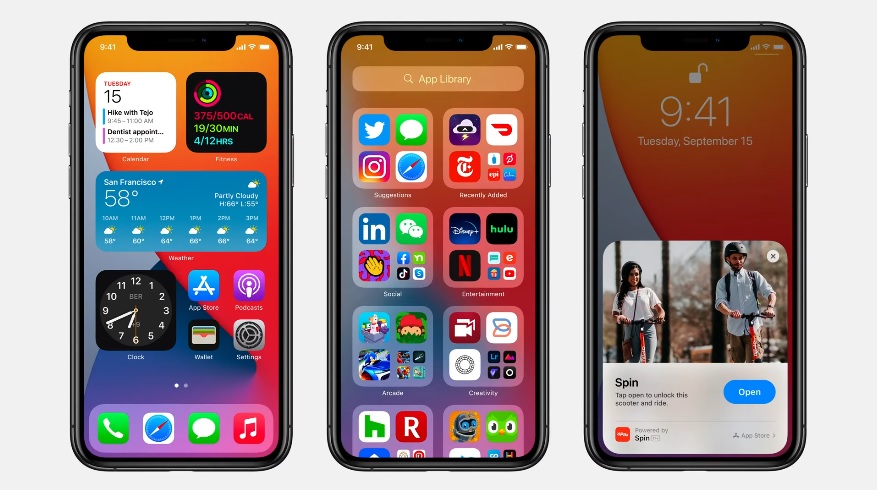
Months ago, the common belief was that the iOS 14 would be released once the new iPhones arrive since that has been the annual tradition for Apple. However, CEO Tim Cook surprised fans after announcing at the Time Flies event that OS updates are going live this week.
The iOS 14, along with iPadOS 14, watchOS 7, and tvOS 14, are confirmed to be released in full on Wednesday, Sept. 16. Of these updates, many are excited the most about the iOS 14 considering how much it is going to change the iPhone experience.
How to install iOS 14
As of this writing, there are reports that iOS 14 has started to roll out on compatible devices. The list includes all iPhones released from iPhone 6s and later, along with both iPhone SE models and iPod Touch 7.
Once the iOS 14 update is available for a user, they should receive an alert on the Settings app, from the General tab under the Software Update menu. Those who have yet to see a notification should not worry because the OS updates are never released all at once for all users around the world. The release date of Sept. 16 practically means to expect the update from this point.
When the update is available on the device, users can initiate the download and install process by tapping on the Software Update menu option. Make sure that there is enough free storage space available, around 5GB, and that the device has more than 50% battery charge left before starting the over-the-air installation. It would not hurt to save a backup of the device before updating it just to make sure that the user will not lose their files in case they encounter some issues in the installation.
iOS 14 delivers big changes in home screen and apps use
During the announcement of iOS 14’s release this week, Cook specifically mentioned the upcoming changes in the home screen such as the widgets customization options. This OS update marks the first time Apple is allowing iOS users to customize the widgets by size and shape and place them on any page of the home screen. Android users have been doing this for a long time now, so seeing this finally become possible on iPhones is a big deal for Apple fans.
Apple is also launching the App Clips, which allows iOS 14 users to try a streamlined version of an app by scanning various types of codes like QR or through an NFC tag. Once scanned, iOS users get to try the app’s features without having to install it.







