SoftBank and Intel Partner to Develop Next-Generation Memory Chips for AI Data Centers
  Nvidia, ByteDance, and the U.S.-China AI Chip Standoff Over H200 Exports
  SpaceX Pushes for Early Stock Index Inclusion Ahead of Potential Record-Breaking IPO
  Oracle Plans $45–$50 Billion Funding Push in 2026 to Expand Cloud and AI Infrastructure
  Global PC Makers Eye Chinese Memory Chip Suppliers Amid Ongoing Supply Crunch
  Elon Musk’s SpaceX Acquires xAI in Historic Deal Uniting Space and Artificial Intelligence
  Samsung Electronics Shares Jump on HBM4 Mass Production Report
  SoftBank Shares Slide After Arm Earnings Miss Fuels Tech Stock Sell-Off
  Nintendo Shares Slide After Earnings Miss Raises Switch 2 Margin Concerns
  Sam Altman Reaffirms OpenAI’s Long-Term Commitment to NVIDIA Amid Chip Report
  Alphabet’s Massive AI Spending Surge Signals Confidence in Google’s Growth Engine
  Instagram Outage Disrupts Thousands of U.S. Users
  Nvidia CEO Jensen Huang Says AI Investment Boom Is Just Beginning as NVDA Shares Surge
  Taiwan Says Moving 40% of Semiconductor Production to the U.S. Is Impossible
  Palantir Stock Jumps After Strong Q4 Earnings Beat and Upbeat 2026 Revenue Forecast


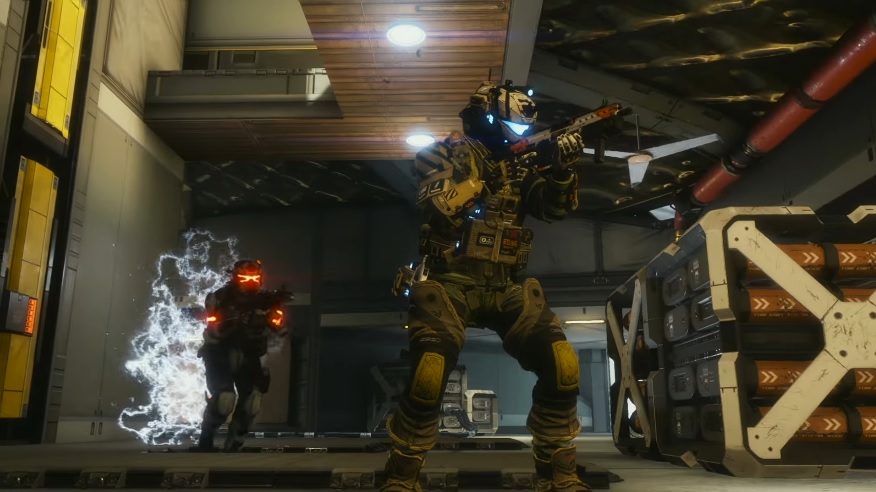
Following up on its promise to expand the FPS Boost availability, Microsoft announced the addition of 13 more games that will now run at up to 120fps framerate. All the newly added titles were from EA development studios, including several titles from the popular “Titanfall” and “Battlefield” franchises.
Microsoft adds 13 games FPS Boost-supported titles for Xbox Series X/S consoles
The FPS Boost is one of the new features Microsoft has introduced to allow older titles to maximize the power of the Xbox Series X/S consoles. Starting with just five games upon launching last February, the list of FPS Boost-supported games now has 23 titles in it.
Some of the most notable games now supported with FPS Boost on Xbox Series X/S are “Battlefield 1,” “Battlefield 4, “Battlefield V,” “Titanfall,” and “Titanfall 2.” The three “Plants vs. Zombies” games released for PC and consoles, as well as “Star Wars: Battlefront” and its sequel, are also part of the Xbox Series X/S update. Completing the list are “Mirror’s Edge Catalyst,” “Sea of Solitude,” and “Unravel 2.”
From Titans and Zombies to Soldiers and Plants, every frame counts.
— Xbox (@Xbox) April 22, 2021
FPS Boost is coming to some of your favorite EA games: https://t.co/Ea0RaRmHG8 pic.twitter.com/YiyhYyujRi
The Xbox Series X/S FPS Boost feature practically doubles the games’ original framerates. Of the 13 new additions, 12 games are confirmed to run at up to 120fps. “Sea of Solitude,” on the other hand, is getting support for 60fps.
This is the biggest batch of games that were given the FPS Boost update, and it is not surprising that these are all published by EA. The companies currently have a good partnership, especially with EA Play being one of the perks of having Xbox Game Pass Ultimate for $14.99 per month. All the games mentioned are also part of the EA Play library, which means they can be accessed without added cost through Game Pass Ultimate.
Xbox Series X/S: Where to find the FPS Boost setting
Microsoft says getting the latest Xbox OS update and rebooting the Xbox Series X/S consoles are recommended to run the games with FPS Boost. There is also a new feature that lets players see if the games are playing with FPS Boost and Auto HDR by simply pressing the Xbox Button on their controllers.
Note that the feature is disabled by default on Xbox Series X for some of the games mentioned. To turn FPS Boost on and off, open the Xbox menu, choose a supported game from My Games & Apps, select Manage game and add-ons, and look for Compatibility options. Players will find the toggle buttons for Auto HDR and FPS Boost on the left side of the screen.