


 Brown-Forman Rejects Sazerac’s $15 Billion Takeover Bid as Family Backs Independence
  CATL Shares Jump as $5.6 Billion Buyback Signals Confidence in Long-Term Growth
  Johnson & Johnson Proposes $5.5 Billion Talc Settlement to Resolve U.S. Ovarian Cancer Lawsuits
  Barclays Q2 Profit Beats Forecasts as Investment Banking Strength Offsets Higher Costs
  Standard Chartered Beats Profit Forecasts as First-Half Earnings Rise 9%
  BHP, Port Hedland Unions Fail to Reach Wage Deal as Negotiations Continue
  Tech Stock Positioning Nears Neutral as Investor Rotation Enters Final Phase, Deutsche Bank Says
  Rio Tinto Stock Jumps as Strong Earnings, Higher Dividend and AI Metal Demand Boost Outlook
  Unilever Raises 2026 Sales Outlook After Strong Q2 Volume Growth
  AstraZeneca Q2 Earnings Beat Forecasts as Oncology Growth Supports 2026 Outlook
  Nvidia Invests $1 Billion in Naver as South Korea AI Data Center Expansion Gains Momentum
  Galp Shares Fall After Q2 EBITDA Miss Despite Profit Beat and Higher Dividend
  Seagate Stock Jumps as AI-Fueled Earnings Beat and Strong FY2027 Outlook Impress Investors
  Philips Shares Slide 10% Despite Earnings Beat as Weak Orders Raise Growth Concerns
  Sika Raises 2026 Sales Outlook After Strong First-Half Results Beat Expectations
  TeamViewer Shares Fall Despite Profit Growth as ARR and Customer Base Decline
  Zabka Shares Drop 10% as Seven & i Abandons Investment Plans


Documents have become an important part of our day-to-day lives and these especially include PDF and Word documents. These documents are now needed almost everywhere, whether it is a presentation or an assignment, these documents are a must.
People working with these documents are not familiar with the programs and tools required for inter-conversion of these documents. Both of these file formats, PDF and Word docs are very important and both of them have their own value. The tool that we need is one that can convert both PDFs into Word Files and Word Files into PDFs.
We will be using Lua PDF Converter and Editor in this example. If you don’t know about Lua then it is a free online PDF Converter and Editor that lets you convert files of other formats such as Word, Excel, JPG, PPT, etc to PDF or from PDF to these file formats. It is simple and easy to use this free tool.
One of the features of Lua PDF Converter is that it lets you convert PDF Documents to Word Files without any cost. The process is simple and easy & with the help of this converter, all of your PDF problems will be solved.
Here is how you can use Lua PDF Converter to Convert PDF Documents to Word Files:
-
Visit the Lua PDF Converter website by typing GetLua.com in the address bar.
-
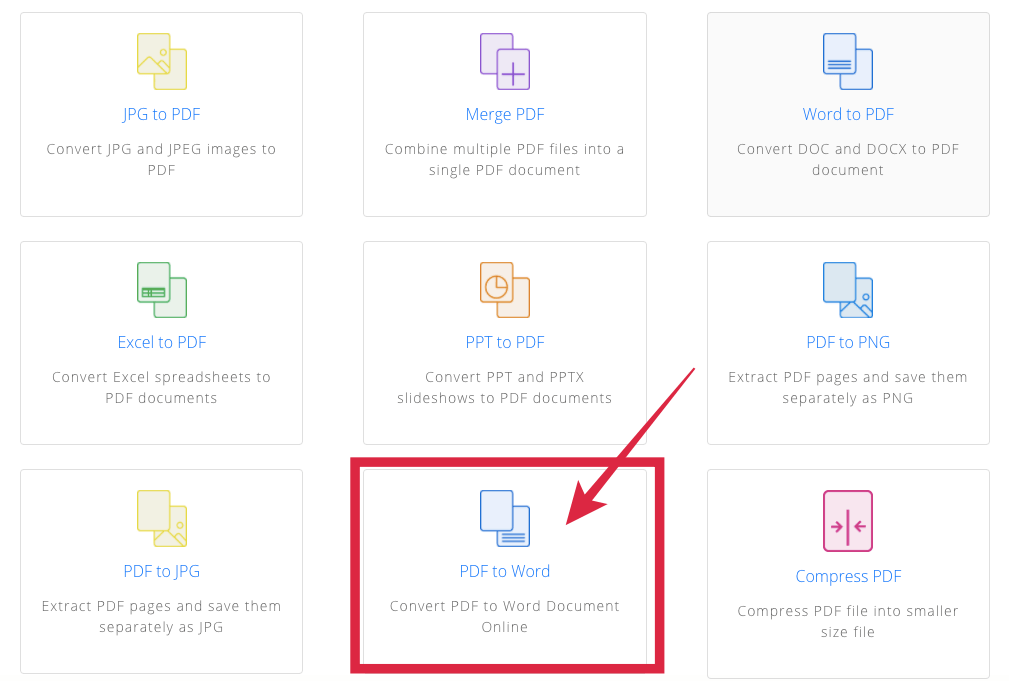
Once the webpage loads, scroll down and click on the PDF to Word option.
-
A new page will appear. You can either browse and choose the PDF file that you want to convert or you can simply drag & drop the file.
-
The conversion process of PDF into Word will start. Wait for the conversion process to be completed.
-
Now, click on Download to save the converted Word File.

Once you have converted the PDF document to Word and made the desired changes and want to transform the document file again back to PDF you may use the Word to PDF converter to do the same.
Lua PDF Converter is a great tool that everyone working with documents should know about. It is not only simple and easy-to-use but is also free and has all the professional features combined into a single platform You get features like editing PDFs, converting to and from PDFs into different file formats all on a single platform.
It is used by many professionals and it could save a lot of time for you. It is a trusted and professional tool that will save you from a lot of hassle. It is free to use and every tool that you get on the website is free of any kind of cost.
This article does not necessarily reflect the opinions of the editors or management of EconoTimes







